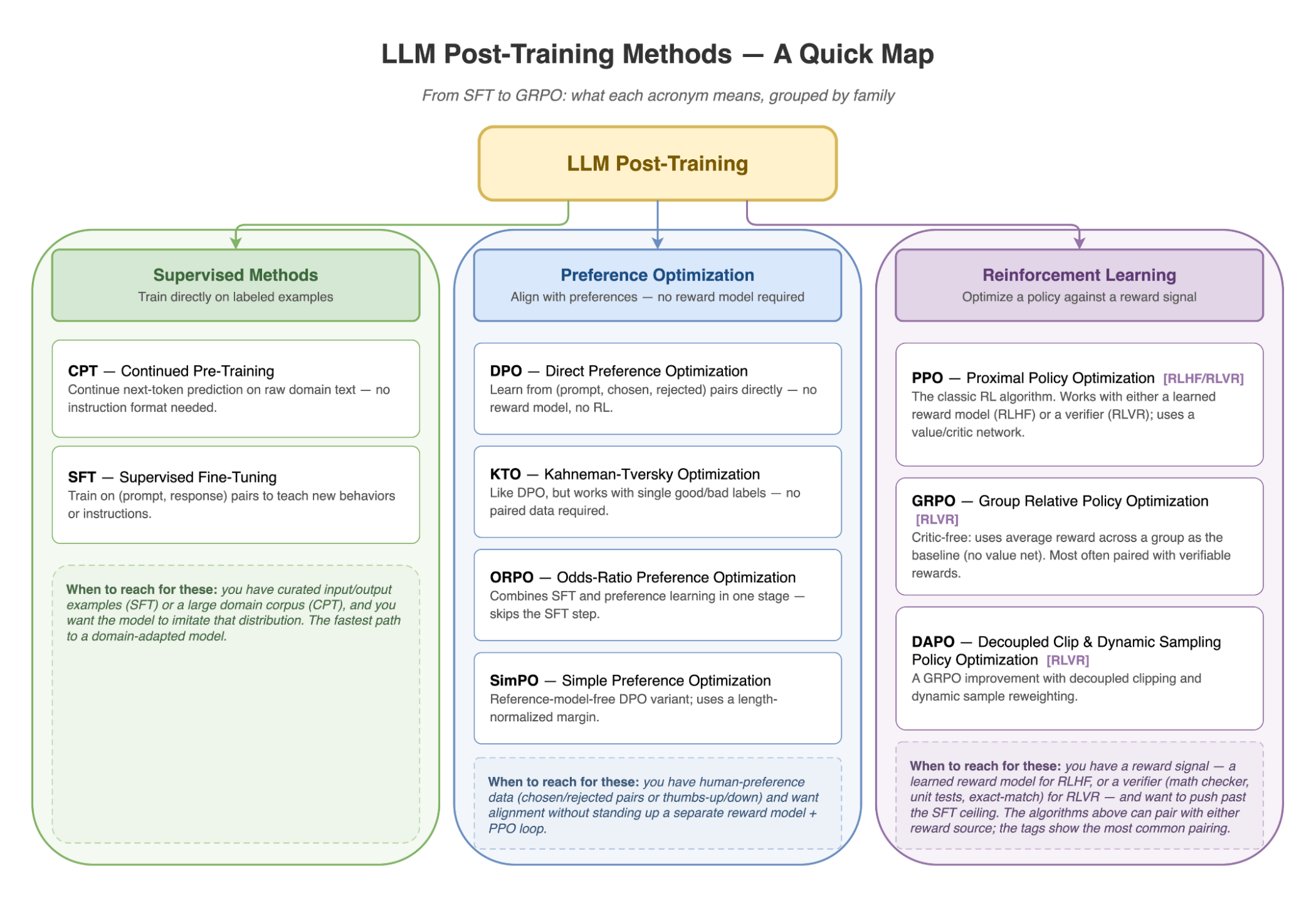
Today we're introducing /anyscale-workload-llm-post-training, a new addition to Anyscale Agent Skills for scoping and generating LLM post-training runs on Anyscale. Given a model, dataset, objective, and target hardware, the skill helps choose between SFT, continued pre-training (CPT), preference optimization methods such as DPO, KTO, ORPO, and SimPO, classic RLHF with PPO, and RLVR methods such as GRPO and DAPO. It then generates standard framework configs for LLaMA-Factory, SkyRL, or Ray Train and prepares them for Anyscale Jobs.
LinkLLM post-training is the new frontier — but harder than ever
LLM post-training has moved through a few distinct waves. The first modern wave was instruction tuning / supervised finetuning (SFT) and Reinforcement Learning from Human Feedback (RLHF) at scale: OpenAI's InstructGPT showed that supervised demonstrations plus human preference rankings could make a smaller GPT-3 model feel more useful and aligned than a much larger base model, and ChatGPT made that recipe familiar to everyone building product LLMs. Strictly speaking, RLHF was not invented by InstructGPT; earlier work used human-feedback reward models for language tasks. But InstructGPT made RLHF the reference architecture for instruction-following LLMs: collect demonstrations, train a reward model from ranked outputs, then optimize the policy, most commonly with Proximal Policy Optimization (PPO).
The second wave made alignment cheaper and easier to operate. Preference optimization methods such as DPO, KTO, ORPO, and SimPO kept the human preference data but removed the separate online RL loop, giving teams a more direct way to move a model toward preferred answers.
DeepSeek-R1 marked the most recent major shift for reasoning models. Its success helped popularize Reinforcement Learning from Verifiable Rewards (RLVR), such as GRPO and DAPO, where the reward comes from a programmatic verifier instead of a learned reward model: math correctness, unit tests, exact match, SQL execution, or another check the system can grade automatically.
That history explains the method menu teams face today: SFT to teach new behaviors, DPO-style methods to align with preference data, RLHF when human preference modeling is central, and GRPO/DAPO-style RLVR when the task can be checked automatically.
Selecting the RL stack has become its own engineering problem. The landscape of open-source RL libraries for LLMs illustrates just how rapidly the post-training ecosystem has fragmented: TRL, verl, OpenRLHF, RAGEN, NeMo-RL, ROLL, AReaL, Verifiers, SkyRL, and slime all target overlapping but different combinations of RLHF, reasoning, and agentic RL. The right choice depends on more than whether you want PPO or GRPO; it also depends on generator and environment abstractions, training backend, inference engine, async rollout support, weight synchronization, and orchestration model.
Once teams move beyond a tutorial and into a real post-training run, the complexity becomes concrete:
Methodology choice. CPT, SFT, DPO, KTO, ORPO, PPO, or GRPO? Each has a different data shape, reward-model requirement, and GPU profile.
Framework choice. A library optimized for text-only RLHF may not expose the environment layer needed for tool-use agents; a high-performance stack may colocate training and generation in ways that reduce GPU usage but constrain rollout flexibility. Picking the wrong starting point can mean rewriting the pipeline halfway through.
GPU planning that's actually right. RLVR setups can require multiple resident model instances — for example, a trainable policy, a frozen reference model for KL regularization, and a vLLM rollout engine. For a dense 7B model in bf16, each copy is roughly 14 GB, so three copies create a ~42 GB weight-memory floor before optimizer state, activations, KV cache, and framework overhead. For MoE models, total parameters drive weight memory even when only a subset of experts is active per token.
Dependency hell. Mismatched CUDA toolkits, unpinned
torchwheels, DeepSpeed compatibility constraints, and FSDP+QLoRA dtype requirements can surface only at runtime. The skill pins dependencies against the selected Anyscale runtime and flags framework-specific settings such asbnb_4bit_quant_storage=torch.bfloat16where required.
LinkWhat we built: a skill that makes the hard decisions with you
/anyscale-workload-llm-post-training walks an AI coding agent through an interactive, multiple-choice requirements flow that mirrors how an Anyscale Forward Deployed Engineer would scope an LLM fine-tuning project — and then generates code, configs, and dependencies for the selected Anyscale runtime.
Before writing any code, the skill:
Picks the methodology — SFT for instruction-following, DPO/SimPO/ORPO for reward-model-free preference optimization, GRPO/DAPO for verifiable-reward tasks, PPO when you need policy optimization with a reward signal, or agentic tuning for tool use.
Recommends a framework — LLaMA-Factory for SFT, CPT, and preference optimization, SkyRL for RLVR and agentic rollouts, or Ray Train for custom training loops and reward models, following the same trade-offs described in Choose a framework for LLM post-training.
Verifies model–framework compatibility by checking the framework's supported-models page against your base model (Llama, Qwen, Gemma, DeepSeek, Mistral, etc.).
Plans GPU memory and node shape — including multi-model RLVR placement, MoE weight accounting, FSDP+QLoRA dtype alignment, and the trade-off between
accelerator_type(flexible scheduling) andanyscale/accelerator_shape(single-node placement for frameworks that benefit from fixed local topology).Estimates training time before launch. A 36-hour run on 4×L4 is surfaced before you start, alongside a comparison table of faster GPU alternatives.
Surfaces evaluation and checkpointing choices — validation dataset paths, checkpoint cadence, artifact storage, and framework-native eval commands are captured in the generated README instead of being left as afterthoughts. This matches the documentation's guidance to evaluate task performance, safety, robustness, and regressions throughout post-training.
Avoids known version traps — pins CUDA-compatible torch wheels in a Dockerfile when needed, accounts for LLaMA-Factory and DeepSpeed compatibility constraints, and flags framework-specific dtype and scheduler settings before the job starts.
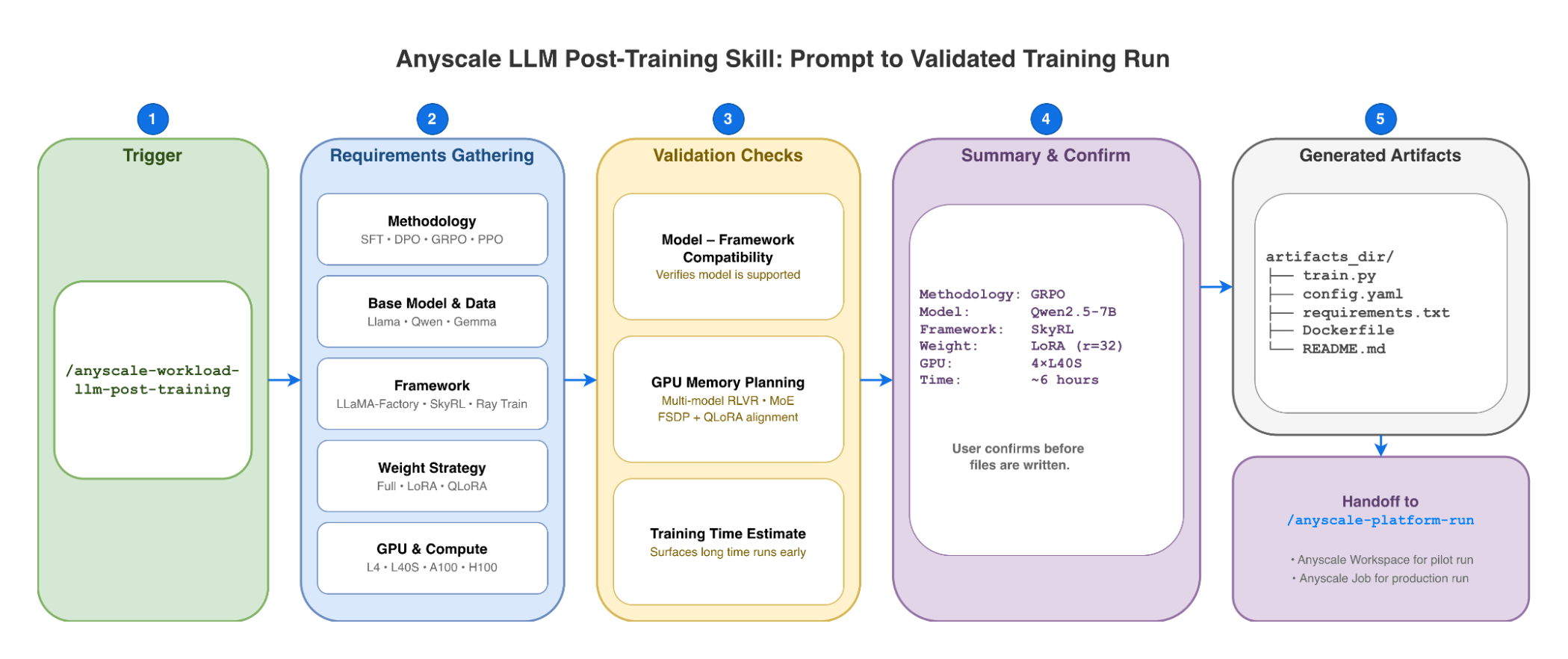
The output is a timestamped artifacts_dir/ containing a native framework script, a YAML config, requirements.txt, a Dockerfile when needed, and a README for launching as an Anyscale Job or running interactively in a workspace. Because the skill generates standard open-source code rather than proprietary abstractions, you retain full control over the training loop.
Note: the skill does not replace ML judgment — teams still own dataset quality and labeling, reward design, eval selection, and final approval before launching jobs that incur cloud costs. Its job is to make the setup, compatibility checks, and operational scaffolding explicit before GPUs start running.
LinkWithout the skill vs with the skill
Failure mode | Without the skill | With the skill |
Wrong methodology for the data | Discovered after first run flatlines | Recommended based on the user's preference-data shape |
| Runtime CUDA mismatch | Torch wheel pinned against the selected Anyscale runtime |
| Hours of triage on the first rollout | Multi-model footprint estimated before launch |
| Schedule blown | Estimate surfaced at config time, with upgrade options |
| Training never starts | Compatibility setting surfaced in generated runtime config |
LinkExample: Launch GRPO on GSM8K with the Agent Skill
/anyscale-workload-llm-post-training train Qwen/Qwen3-1.7B-Instruct with GRPO on GSM8K dataThe agent gathers requirements, then surfaces a confirmation summary before generating any files:
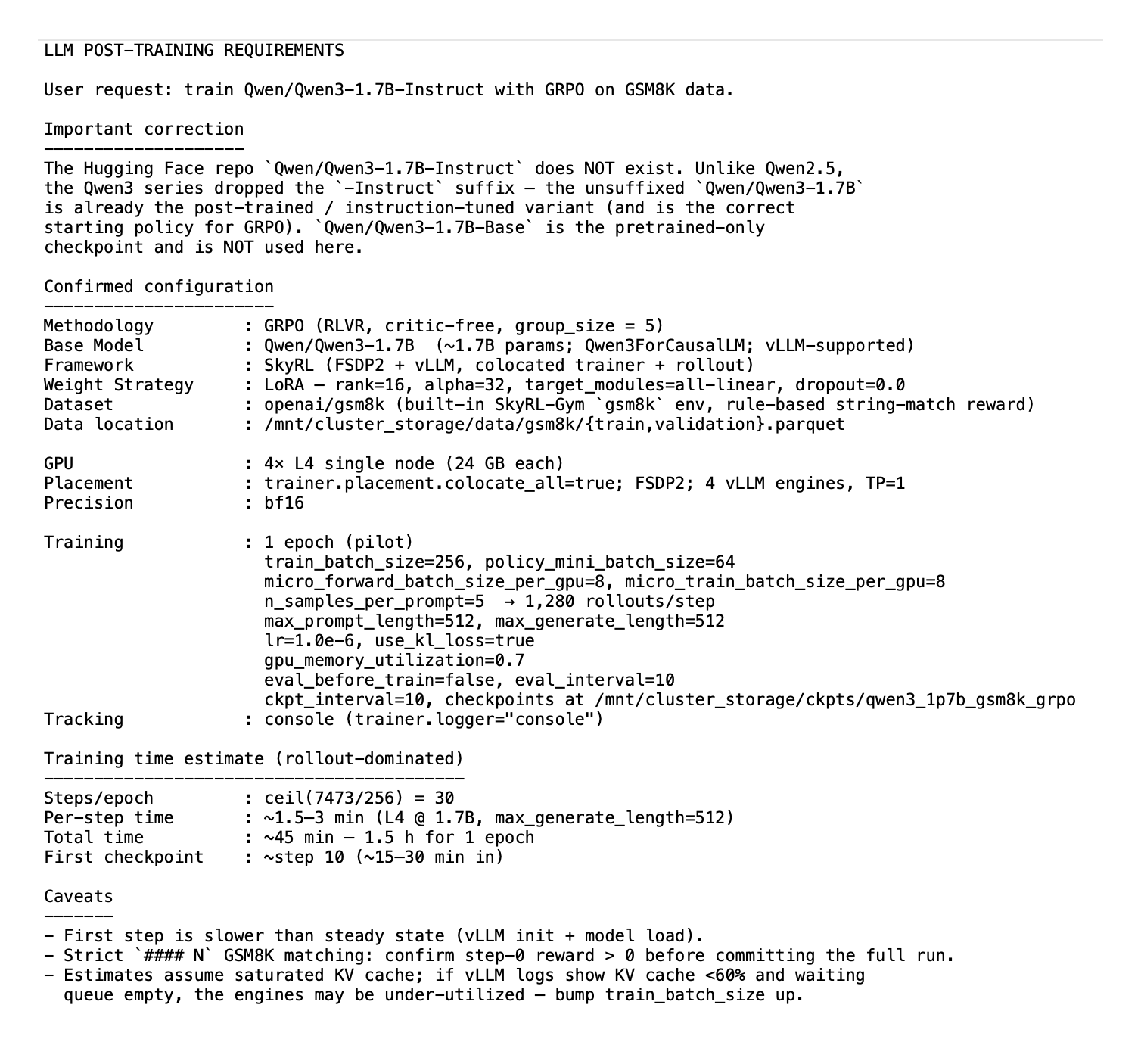
Once confirmed, the skill writes a timestamped artifact directory and hands off to /anyscale-platform-run, which launches it on Anyscale (workspace for interactive iteration, job for unattended runs). The flow follows the same GRPO with SkyRL pattern documented for Anyscale Jobs.
qwen25_7b_instruct_grpo_gsm8k_llm_posttraining_<timestamp>/
├── README.md                  # setup, monitoring, eval, LoRA/merged deployment
├── user_request_summary.txt   # frozen config + memory budget + time estimate
├── workspace.yaml             # 4× L40S single node on the SkyRL FSDP image
├── requirements.txt           # extras for data prep (image has the rest)
├── prepare_data.py            # wraps SkyRL's gsm8k_dataset.py + 64-row pilot slice
├── run_train.sh # script to start the training process LinkExecuting runs and resolving errors with the Anyscale Platform Skills
Once the skill generates your training assets, the agent will recommend using /anyscale-platform-run to initiate a pilot execution. This short-cycle validation checks model loading, FSDP2 sharding, vLLM initialization, weight synchronization, and reward logic within minutes, surfacing OOM errors or configuration traps before you commit to a full-scale run. Upon a successful pilot, the agent prompts you to launch the production training job across your entire dataset.
When a run encounters a mid-flight failure—whether it’s an NCCL timeout, disk exhaustion during checkpointing, or a diverging loss curve—the platform removes the need to manually SSH into nodes or parse raw Ray logs. Instead, /anyscale-platform-fix can analyze the active job telemetry, actor logs, and cluster metrics to diagnose the root cause. The skill can also monitor the training process in real-time, detecting issues like the reward signal remains to 0 and proposing actionable resolutions—such as adjusting the reward verifier logic or the vLLM config parameters. It can then relaunch the environment or job upon your approval, and once training is complete, the skill can automate merging the LoRA adapters back into the base LLM weights.
LinkComposes with other Agent Skills
Once your post-training run completes, you can transition to production by leveraging the /anyscale-workload-llm-serving skill to launch the model as an Anyscale Service.
/anyscale-workload-llm-serving deploy [path_to_checkpoints] as a multi-LoRA endpointAlternatively, you may merge the LoRA adapters into the base weights and utilize the /anyscale-workload-ray-data skill to orchestrate a large-scale batch inference workload:
/anyscale-workload-llm-post-training merge lora adapter [path_to_checkpoints] to the base LLM and then use /anyscale-workload-ray-data to summarize PDFs in [path_to_pdf_files]LinkGet started
The post-training skill ships with the existing Agent Skills release and installs through the Anyscale Agent Skills installation flow.
If you don't see /anyscale-workload-llm-post-training in anyscale skills list, update the Anyscale CLI and confirm that the skill is available for your organization.
LinkResources:
Table of contents
- LLM post-training is the new frontier — but harder than ever
- What we built: a skill that makes the hard decisions with you
- Without the skill vs with the skill
- Example: Launch GRPO on GSM8K with the Agent Skill
- Executing runs and resolving errors with the Anyscale Platform Skills
- Composes with other Agent Skills
- Get started
- Resources: