Introducing KubeRay v1.5
Special thanks to these KubeRay contributors: Anyscale (Jui-An Huang, Han-Ju Chen, You-Cheng Lin), Google Cloud (Andrew Sy Kim, Ryan O'Leary, Aaron Liang, Spencer Peterson), xAI (Kai-Hsun Chen), Alibaba Cloud (Kun Wu, Yi Chen, Jie Zhang), Roblox (Steve Han), Nvidia (Ekin Karabulut), Bloomberg (Wei-Cheng Lai), opensource4you (Jie-Kai Chang, Yi Chiu, Jun-Hao Wan, Che-Yu Wu, Nai-Jui Yeh, Fu-Sheng Chen).
We’re excited to announce the release of KubeRay v1.5, building on the strong momentum of Ray on Kubernetes. KubeRay v1.5 introduces several enhancements for running Ray on Kubernetes, incorporating over 180 commits contributed by approximately 50 contributors.
Key Highlights
Security: Full support for Ray authentication token mode to secure cluster access.
RayService: Incremental upgrades for zero-downtime updates with minimal resource overhead.
RayJob: New sidecar submission mode, advanced deletion policies for cost-effective debugging, and lightweight submitters for faster startup.
RayCluster: Kueue + Ray autoscaler integration, top-level Label Selector API, multi-host worker indexing for TPUs/GPUs, and NVIDIA Kai-Scheduler integration to enable gang scheduling, workload autoscaling, and workload prioritization.
Performance: New tuning guides for large-scale scenarios.
LinkSecurity Enhancements
LinkAuth Token support
Starting with Ray 2.52.0, token-based authentication is available to secure your Ray clusters. KubeRay v1.5.1 brings full support for this critical security feature.
For more details, you can read this article.
KubeRay automates the entire token management lifecycle. Simply enable authentication in your RayCluster, RayJob, or RayService:
1apiVersion: ray.io/v1
2kind: RayCluster
3metadata:
4  name: ray-cluster-with-auth
5spec:
6  rayVersion: '2.52.0'
7  authOptions:
8    mode: token  # Options: "token" or "disabled"
9  headGroupSpec:
10    # ... rest of configuration
The KubeRay operator will automatically:
Generates a unique token per RayCluster or RayJob
Stores it as a Kubernetes Secret
Mounts the token into all Ray pods
To get the token, use the Ray kubectl plugin. For example:
1kubectl ray get token ray-cluster-with-auth
2vpQGTkVj6GFzQ1V+HcUAVYvCNxhtQp4tl+5mK8OjxkU=
3
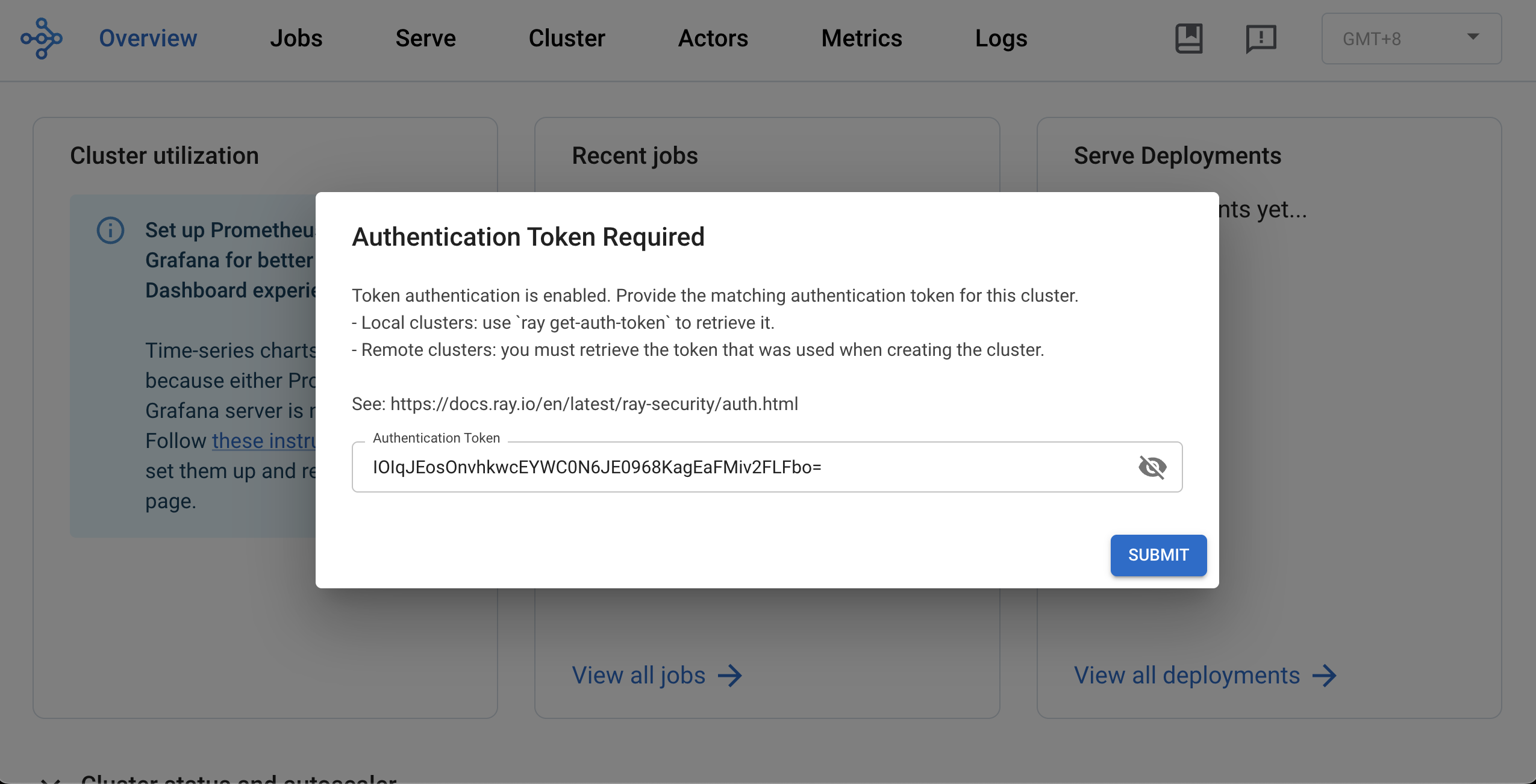
You can then use this token to access the Ray Dashboard.
LinkRayService Enhancements
LinkIncremental Upgrade Strategy
KubeRay v1.5 introduces an incremental upgrade strategy for RayService, dramatically reducing the resource overhead during service upgrades. Instead of provisioning a full second cluster for blue-green deployments, this feature gradually migrates traffic from the old cluster to a new one, scaling each cluster up or down as needed.
For example, with a 20% surge setting, the same 5-GPU cluster would only require 6 GPUs during the upgrade window, using only 60% of the resources compared to traditional blue-green deployments.
To enable this feature, set the following fields in RayService:
1apiVersion: ray.io/v1
2kind: RayService
3metadata:
4  name: rayservice-incremental-upgrade
5spec:
6  upgradeStrategy:
7    type: NewClusterWithIncrementalUpgrade
8    clusterUpgradeOptions:
9      maxSurgePercent: 20
10      stepSizePercent: 5
11      intervalSeconds: 10
12      gatewayClassName: istio
This feature is disabled by default and requires enabling the RayServiceIncrementalUpgrade feature gate.
LinkRayJob Enhancements
LinkRayJob Sidecar submission mode
The RayJob resource now supports a new value for spec.submissionMode called SidecarMode.
Sidecar mode directly addresses a key limitation in both K8sJobMode and HttpMode: the network connectivity requirement from an external Pod or the KubeRay operator for job submission. With Sidecar mode, job submission is orchestrated by injecting a sidecar container into the Head Pod. This solution eliminates the need for an external client to handle the submission process and reduces job submission failure due to network failures.
To use this feature, set spec.submissionMode to SidecarMode in your RayJob:
1apiVersion: ray.io/v1
2kind: RayJob
3metadata:
4  name: my-rayjob
5spec:
6  submissionMode: "SidecarMode"
7 ...LinkAdvanced deletion policies
The original RayJob deletion mechanism offered limited flexibility—a single action triggered by a global TTL, regardless of job outcome. KubeRay 1.5 introduces a rule-based deletion API that stages cleanup actions with per-status timers.
Previous versions forced an all-or-nothing choice: either keep all resources for debugging (wasting money on idle GPUs) or clean up everything immediately (losing valuable diagnostic information) . You couldn’t preserve just the head pod for log inspection while releasing expensive worker nodes, nor could you apply different retention policies for successful versus failed jobs.
Debug failed jobs cost-effectively: When a training job fails, keep the head pod for 30 seconds to inspect logs and metrics while immediately freeing expensive GPU workers. After debugging, clean up the entire cluster.
For example, you can use different policies for different outcomes: Retain successful jobs for 60 seconds for post-run validation and data export, then clean up. For failed jobs, preserve resources for 24 hours for thorough post-mortem analysis.
Define staged cleanup with per-rule conditions:
1apiVersion: ray.io/v1
2kind: RayJob
3metadata:
4  name: rayjob-deletion-rules
5spec:
6  deletionStrategy:
7    deletionRules:
8      # After failure: staged cleanup for cost-effective debugging
9      - policy: DeleteWorkers
10        condition:
11          jobStatus: FAILED
12          ttlSeconds: 30
13      - policy: DeleteCluster
14        condition:
15          jobStatus: FAILED
16          ttlSeconds: 3600
17      - policy: DeleteSelf
18        condition:
19          jobStatus: FAILED
20          ttlSeconds: 3630
21      # After success: quick cleanup
22      - policy: DeleteCluster
23        condition:
24          jobStatus: SUCCEEDED
25          ttlSeconds: 60
26      - policy: DeleteSelf
27        condition:
28          jobStatus: SUCCEEDED
29          ttlSeconds: 90
The legacy onSuccess and onFailure fields are deprecated in 1.5 and will be removed in 1.6.0—migrate to deletionRules for multi-stage control. This feature requires enabling the RayJobDeletionPolicy feature gate.
LinkLight weight job submitter
When using RayJob with K8sJobMode, the submitter container previously had to pull the full Ray image, which typically exceeds 1 GB even in its minimal version without ML libraries. This resulted in slow job startup times, especially in environments with limited network bandwidth.
KubeRay v1.5 introduces a lightweight job submitter option that eliminates this overhead. By using a minimal submitter image (13.2MB), you can significantly improve RayJob startup performance.
You can try the example here.
LinkBatch Scheduler Integration (Yunikorn and Volcano)
Before KubeRay v1.5, only the RayCluster custom resource could be integrated with batch schedulers such as Yunikorn and Volcano. This means RayJob itself could not participate in gang scheduling, and the submitter pod was scheduled independently from the RayCluster pods.
KubeRay v1.5 introduces native Yunikorn and Volcano support for the RayJob custom resource. With this enhancement, a RayJob, its submitter pod, and its associated RayCluster can now be gang-scheduled as a single unit. This ensures that the entire job starts only when all required resources are available.
Below is an example showing how to enable gang scheduling for Yunikorn using labels on the RayJob:
1apiVersion: ray.io/v1
2kind: RayJob
3metadata:
4  name: rayjob-yunikorn-0
5  labels:
6    ray.io/gang-scheduling-enabled: "true"
7    yunikorn.apache.org/app-id: rayjob-yunikorn-0
8    yunikorn.apache.org/queue: root.test
9
See here for more details on KubeRay’s integration with Yunikorn.
Below is an example RayJob configured to use Volcano:
1apiVersion: scheduling.volcano.sh/v1beta1
2kind: Queue
3metadata:
4  name: kuberay-test-queue
5spec:
6  weight: 1
7  capability:
8    cpu: 4
9    memory: 6Gi
10---
11apiVersion: ray.io/v1
12kind: RayJob
13metadata:
14  name: rayjob-sample-0
15  labels:
16    ray.io/scheduler-name: volcano
17    volcano.sh/queue-name: kuberay-test-queue
18...
19
See here for more details on KubeRay’s integration with Volcano.
LinkRayCluster Enhancements
LinkRay Label Selector API
Ray v2.49 introduced a label selector API. Correspondingly, KubeRay v1.5 now features a top-level API for defining Ray labels and resources. This new top-level API is the preferred method going forward, replacing the previous practice of setting labels and custom resources within rayStartParams.
The new API will be consumed by the Ray autoscaler, improving autoscaling decisions based on task and actor label selectors. Furthermore, labels configured through this API are mirrored directly into the Pods. This mirroring allows users to more seamlessly combine Ray label selectors with standard Kubernetes label selectors when managing and interacting with their Ray clusters.
You can use the new API in the following way:
1apiVersion: ray.io/v1
2kind: RayCluster
3spec:
4  ...
5  headGroupSpec:
6    rayStartParams: {}
7    resources:
8	  cpu: "1"
9	labels:
10	  ray.io/region: us-central2
11  ...
12  workerGroupSpecs:
13  - replicas: 1
14    minReplicas: 1
15    maxReplicas: 10
16    groupName: large-cpu-group
17    labels:
18      cpu-family: intel
19      ray.io/market-type: on-demand
20LinkMulti-Host Worker Indexing
Previous KubeRay versions supported multi-host worker groups via the numOfHosts API, but lacked fundamental capabilities for managing multi-host accelerators. Specifically, it lacked logical grouping of Pods in the same multi-host unit (slice) and ordered indexing required for coordinating TPU workers.
When the RayMultiHostIndexing feature gate is enabled in KubeRay v1.5, KubeRay automatically sets the following labels:
All worker pods:
ray.io/worker-group-replica-index: Ordered replica index (0 to replicas-1) within the worker group, useful for multi-slice TPUs.
Multi-host worker pods only (numOfHosts > 1):
ray.io/worker-group-replica-name: Unique identifier for each replica (host group/slice), enabling group-level operations like "replace all workers in this group".
ray.io/replica-host-index: Ordered host index (0 to numOfHosts-1) within the replica group.
These labels enable reliable, production-level scaling and management of multi-host GPU workers and TPU slices.
Note: This feature is disabled by default and requires enabling the RayMultiHostIndexing feature gate.
LinkKueue + Ray Autoscaler Integration
Kueue now supports using the Ray autoscaler with both RayCluster and RayService when using KubeRay, and will support RayJob in the future.
For details, see the documentation.
LinkKai-Scheduler Integration
The NVIDIA KAI Scheduler is now integrated with KubeRay, enabling features like gang scheduling, workload autoscaling, and workload prioritization in Ray environments.
This integration allows for coordinated startup of distributed Ray workloads, efficient GPU sharing, and prioritization of workloads, ensuring that high-priority inference jobs can preempt lower-priority training jobs.
For more details, you can read here.
LinkPerformance and Scalability
LinkLoad Test: RayCluster Autoscaling with Higher Controller Concurrency
For large-scale Kubernetes clusters, KubeRay’s default concurrency settings may become a bottleneck. We conducted load testing with KubeRay v1.3.0 (using Ray 2.46.0 and Ray Autoscaler v1) to validate performance improvements:
Test Scenario:
100 Kubernetes nodes (mocked with Kwok)
100 RayClusters initially with 0 workers
Scale all clusters to 100 replicas each (10,000 total pods)
Kubernetes client QPS: 50, Burst: 50
Concurrency set to 10 (default: 1)
Result: KubeRay created all 10,000 pods in 3 minutes 20 seconds.
LinkTuning Guide for Large-Scale Deployments
To optimize KubeRay for large Kubernetes clusters, we recommend you to adjust two critical parameters:
Reconcile Concurrency controls how many RayCluster CRs the operator reconciles simultaneously. Higher values enable faster parallel processing of multiple clusters.
Kube Client QPS and Burst determine the rate limits for communication between KubeRay and the Kubernetes API server. Increasing these values prevents client-side throttling during rapid scale-up operations.
Together, these parameters significantly accelerate RayCluster scale-up and scale-down operations:
1helm install kuberay-operator kuberay/kuberay-operator \
2  --version 1.5.1 \
3  --set reconcileConcurrency=20 \
4  --set kubeClient.qps=100 \
5 --set kubeClient.burst=200LinkAPI Server and Dashboard Enhancements
LinkAPIServer v2 Compute Template
KubeRay v1.4.0 introduced the alpha version of API Server v2, designed to eventually replace API Server v1. API Server v2 provides an HTTP proxy to the Kubernetes API server and reuses the existing KubeRay CRD OpenAPI spec.
In KubeRay v1.5, we reintroduced the compute templates feature, but made it optional. Previously (in API Server v1), users were required to define resources through templates. With API Server v2, templates are no longer mandatory, and users can choose whether to create one. This makes migration from v1 to v2 much smoother.
You can still define a compute template in v2 just as before:
1curl -X POST '{your_host}/apis/v1/namespaces/default/compute_templates' \
2--header 'Content-Type: application/json' \
3--data '{
4  "name": "default-template",
5  "namespace": "default",
6  "cpu": 2,
7  "memory": 4
8}'
Then reference the template in your KubeRay resources:
1apiVersion: ray.io/v1
2kind: RayCluster
3metadata:
4  name: my-raycluster
5spec:
6  headGroupSpec:
7    computeTemplate: default-template
8    ...
9  workerGroupSpecs:
10  - groupName: worker-group
11    computeTemplate: default-template
12    ...
See the README.md to get started with APIServer v2.
LinkIntegrate KubeRay Dashboard with APIServer v2
KubeRay 1.4.0 introduced an alpha release of the KubeRay Dashboard, which was based on KubeRay API Server v1. As API Server v1 is scheduled for deprecation, KubeRay 1.5.0 delivers an updated Dashboard that is fully integrated with API Server v2.
For users who still rely on API Server v1, limited backward compatibility is maintained, supporting viewing and deletion of RayJobs and RayClusters.
In KubeRay 1.5.0, we resolved several stability issues and defects to enhance the Dashboard’s reliability and user experience.
This release also introduces a new navigation improvement: users can now click the Ray icon within a RayJob or RayCluster row to be redirected directly to the corresponding Ray Dashboard Page.
Furthermore, the ComputeTemplate UI and workflow have been comprehensively refactored to adopt the API Server v2 APIs. Creating a RayJob is now significantly streamlined—users simply select a resource, and the Dashboard automatically generates the appropriate RayJob specification.
LinkJoin the Ray Community
KubeRay v1.5 delivers enhanced extensibility and more robust building blocks for creating scalable ML platforms with Ray on Kubernetes. As we look ahead to v1.6, we are collaborating with the Ray community to shape the roadmap. Help us build the future of KubeRay by sharing your feedback on kuberay#2999.
You can also join the Ray Slack workspace’s #kuberay channel to ask your questions. In addition, follow the Ray/KubeRay community Google calendar to join the KubeRay bi-weekly community meeting to meet KubeRay contributors.
Follow the instructions below to get started, and check Getting Started with KubeRay for more details.
1helm repo add kuberay https://ray-project.github.io/kuberay-helm/
2helm repo update
3# Install both CRDs and KubeRay operator v1.5.1.
4helm install kuberay-operator kuberay/kuberay-operator --version 1.5.1
Table of contents
- Security Enhancements
- Auth Token support
- RayService Enhancements
- Incremental Upgrade Strategy
- RayJob Enhancements
- RayJob Sidecar submission mode
- Advanced deletion policies
- Light weight job submitter
- Batch Scheduler Integration (Yunikorn and Volcano)
- RayCluster Enhancements
- Ray Label Selector API
- Multi-Host Worker Indexing
- Kueue + Ray Autoscaler Integration
- Kai-Scheduler Integration
- Performance and Scalability
- Load Test: RayCluster Autoscaling with Higher Controller Concurrency
- Tuning Guide for Large-Scale Deployments
- API Server and Dashboard Enhancements
- APIServer v2 Compute Template
- Integrate KubeRay Dashboard with APIServer v2
- Join the Ray Community