Serving GLM-5.2 with Ray Serve on Anyscale, powered by Lambda Compute
Anyscale, the production platform from Ray's creators, now runs natively on Lambda's Managed Kubernetes. The pairing gives teams the full AI compute stack (serving, batch inference, and training) on Lambda GPUs, with no platform team required. The proof: a 756 GB frontier model lives across 16 H100s, behind a standard chat-completions endpoint, in about an hour.
Many companies are turning to open-weight models to stabilize costs, tune performance, and maintain data sovereignty for internal and external use cases. The tradeoff for these outcomes is that companies now have to solve for two major hurdles: 1) acquiring GPUs, and 2) operationalizing multi-node GPUs as inference engines. This blog dives into how Anyscale and Lambda have partnered to tackle each of these.
In this hands-on guide, you'll serve GLM-5.2, a frontier open-weight model too large for any single machine, by splitting it over two 8× H100 nodes on Lambda's Managed Kubernetes (MK8s). Validated stack: Anyscale operator 1.7.2 · Ray 2.56.1 · vLLM 0.23. You bring the Kubernetes cluster (here, a Lambda 1-Click Cluster with 3 CPU control-plane nodes and two 8× H100 workers) and an S3 bucket; Anyscale turns them into a production platform: workload scheduling across heterogeneous compute, autoscaling, versioned rollouts with health gates, and observability from engine metrics down to per-replica logs, all behind a standard chat-completions HTTPS endpoint.
LinkDeployment at a glance: hardware, stack, and sizing
Every step was validated live. The arithmetic determines the hardware, and each row maps to a config argument:
Quantity | Value | Config argument | Why |
Model weights (FP8) | ~756 GB |
| Checkpoint size |
VRAM per node | 640 GB | n/a | 8 × H100-80GB |
Tensor parallelism | 16 |
| ~47 GB of weights per GPU, spanning both nodes |
GPUs per replica | 16 |
| One replica uses the whole cluster |
Context length | 131,072 tokens |
| FP8 KV cache fits this in the remaining VRAM |
The deployment uses tensor parallelism across all 16 GPUs: each H100 holds ~47 GB of the model, and Ray Serve's placement group makes the two nodes work as one inference engine. Cross-node TP means every decode step communicates between nodes, so stream long responses. On a fixed two-node pool, max_replicas=1 follows from the arithmetic, updates run --in-place, and other GPU workloads queue around the service. The payoff: predictable pricing on hardware you hold.
LinkThe Lambda + Anyscale serving stack
The Anyscale operator makes only outbound HTTPS calls, keeping your cluster isolated. Ray Serve LLM adds the production layer: placement groups that pack a multi-node TP replica across the right nodes, autoscaling, health-gated rollouts, and a chat-completions API ingress.
Layer | Component | Responsibility |
GPU compute | Lambda MK8s (RKE2) | 8× H100 nodes, GPU operator, networking |
Workload scheduler | Anyscale operator (Helm) | Pod lifecycle, autoscaling, S3 artifacts, TLS ingress |
Serving framework | Ray Serve LLM | Replicas, placement, health checks, serving API |
Inference engine | vLLM 0.23 | TP=16 execution, FP8 KV cache, continuous batching |
Link
Step 1: Register the cluster as an Anyscale cloud
Register the cloud, then install the operator with Helm per the deployment docs:
anyscale cloud register \
  --name lambda-mk8s \
  --provider generic \
  --region us-east \
  --compute-stack k8s \
  --cloud-storage-bucket-name s3://<YOUR_BUCKET> \
  --cloud-storage-bucket-region us-west-2
Two configuration choices save hours:
Instance types are whole nodes. Declare one shape (
192CPU-1500GB-8xH100) that claims all 8 GPUs of a worker; think node-granularity on a fixed pool.Tolerations are per instance type. Lambda taints GPU nodes
nvidia.com/gpu=true:NoSchedule, which differs from Anyscale's default key; declare it on every GPU shape.
LinkStep 2: Define the model with Ray Serve LLM
One prerequisite: Ray 2.56.1 ships with vLLM 0.22, which doesn't support GLM-5.2, so we built a custom image that upgrades to vLLM 0.23. With the image in place, the entire application is one Python object; every value from the capacity table appears as a named argument:
from ray.serve.llm import LLMConfig, build_openai_app

llm_config = LLMConfig(
    model_loading_config=dict(model_id="my-glm52", model_source="zai-org/GLM-5.2-FP8"),
    accelerator_type="H100",
    deployment_config=dict(autoscaling_config=dict(min_replicas=1, max_replicas=1)),
    engine_kwargs=dict(
        max_model_len=131072,
        tensor_parallel_size=16,       # 16 H100s across 2 nodes (PP unsupported for GLM-5.x)
        kv_cache_dtype="fp8",          # halves KV memory
        tool_call_parser="glm47", enable_auto_tool_choice=True,
        reasoning_parser="deepseek_r1",  # separates <think> traces; glm45 parser is buggy in vLLM 0.23
        max_num_seqs=32, gpu_memory_utilization=0.8,
    ),
    log_engine_metrics=True,  # TTFT/TPOT/KV-cache metrics in the dashboard
)
app = build_openai_app({"llm_configs": [llm_config]})
Two hard-won lessons are baked into that config, and each one saves you a debugging session. First, skip MTP speculative decoding: GLM-5.2's architecture has no multi-token-prediction heads, so a speculative_config with method="mtp" fails at engine startup. Second, the reasoning parser that looks right is the wrong one: glm45 crashes the vLLM engine on GLM-5.2 (vLLM issues #29763 and #44267), so the config uses deepseek_r1, whose DeepSeekR1ReasoningParser handles GLM-5.x's <think>/</think> tags correctly.
LinkStep 3: Deploy and query
Deploy the service:
anyscale service deploy -f service.yamlAnyscale maps the app onto a CPU head node plus the 8xH100 workers. What to expect:
Serving in about 30 minutes: one automated flow covers image pull, cluster startup, downloading and loading 756 GB of weights onto 16 GPUs (~15–20 min of that), and CUDA graph capture.
Iterate with
--in-placeto avoid re-loading 756 GB of weights on every config change.The endpoint speaks standard chat completions: any client works unchanged, chain-of-thought arrives in a separate
reasoningfield, and tool calling uses thestandard tools=[...]parameter.
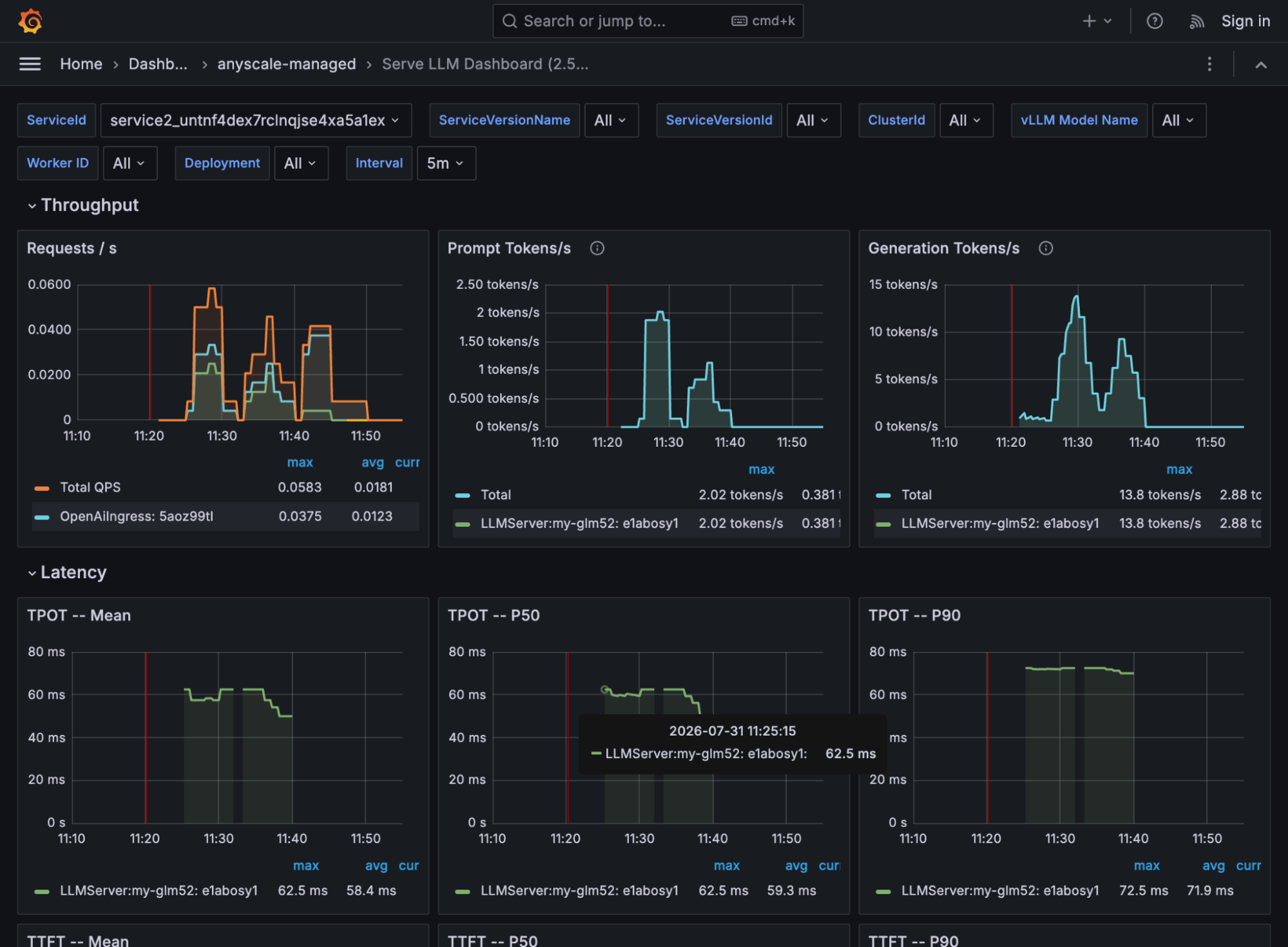
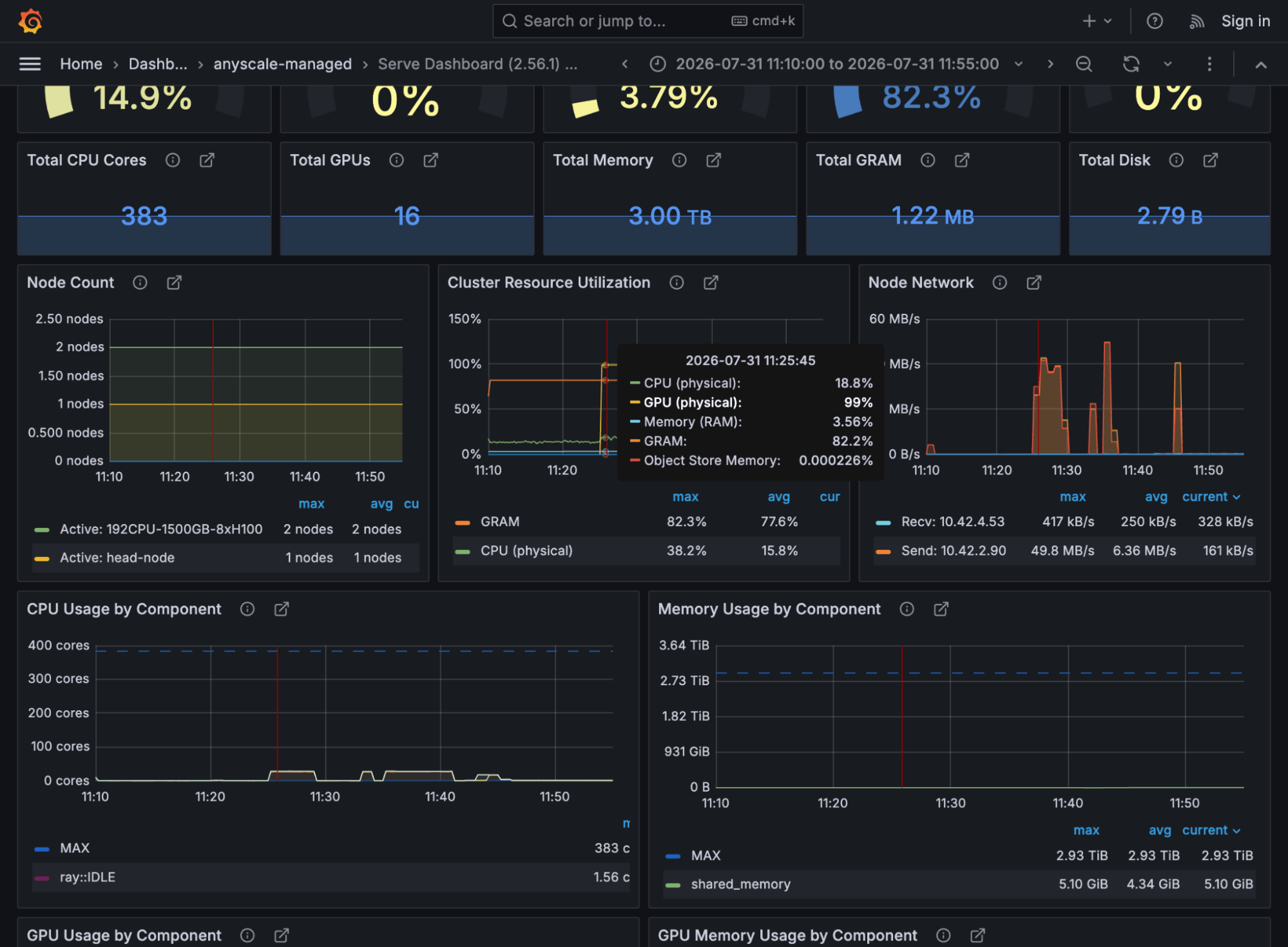
Anyscale observability tells the story of the deployment stage by stage, and Anyscale agent skills can query and interpret these metrics for you:
Weight loading: the checkpoint streams in at ~2 GB/s on the node network while cluster GPU memory climbs steadily to ~61%, the 756 GB of weights sharded across 16 H100s
Engine startup: KV-cache preallocation steps GPU memory up to its 82% plateau (
gpu_memory_utilization=0.8), with a 131,072-token context window liveServing: GPU compute spikes to 99% during generation while the two nodes exchange decode traffic; TTFT P50 ~390 ms and TPOT P50 ~59 ms per token (P90 ~72 ms) as the pre-tuning baseline
Ground truth: serve status on the head node; per-replica logs in the Ray dashboard or via anyscale logs service
$ serve status   # on the head node
applications:
  default:
    status: RUNNING
    deployments:
      LLMServer:my-glm52: {status: HEALTHY, replica_states: {RUNNING: 1}}
      OpenAiIngress:      {status: HEALTHY, replica_states: {RUNNING: 1}}
The replica log tells you the engine is up; this is the sequence to look for:
Using executor class: <class 'vllm.v1.executor.ray_executor_v2.RayExecutorV2'>
...
Started vLLM engine.
Finished initializing replica.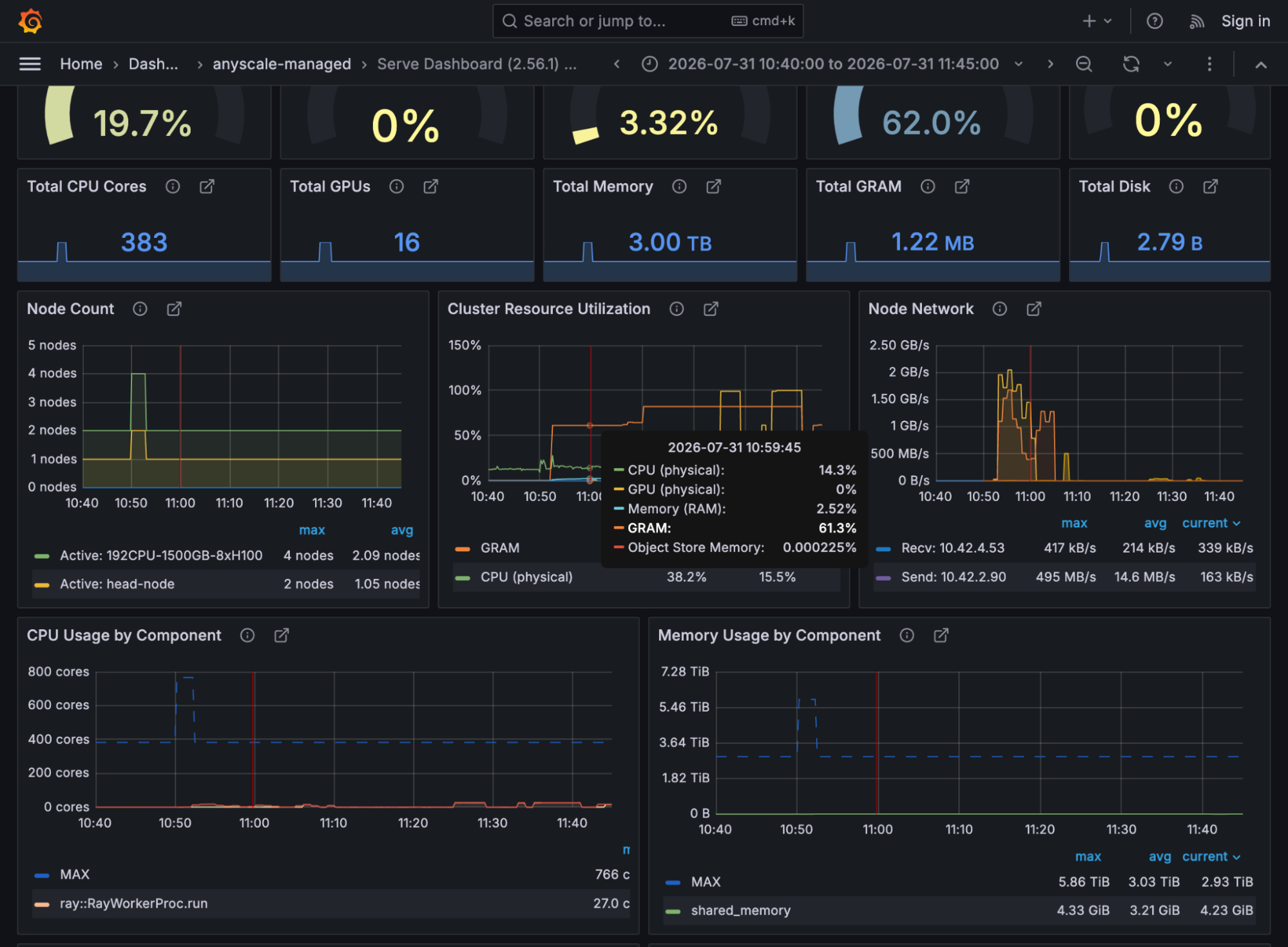
LinkIn summary
Serving a multi-node frontier model is now well within reach of any ML team. Using Lambda and Anyscale, any team can simplify and accelerate the four layers that need to be right for self-hosted open-weight model serving:
Infrastructure: Lambda MK8s (GPU Kubernetes)
Workload scheduler: Anyscale
Serving framework: Ray Serve LLM
Inference engine: vLLM (TP=16, FP8 KV cache)
The LLMConfig above is the entire application code; everything else is configuration.
Get started: Deploy Anyscale on Kubernetes · Ray Serve LLM docs · Lambda 1-Click Clusters · Anyscale services · Anyscale agent skills
Find Anyscale and Lambda at Ray Summit 2026 for the live version of this story.